# BeforeAfterSlider

![](https://img.shields.io/badge/language-ES6-yellow.svg) [![NPM Version](https://img.shields.io/npm/v/before-after-slider.svg)](https://www.npmjs.com/package/before-after-slider) [![LICENSE](https://img.shields.io/npm/l/@eteplus/typeof.svg)](https://github.com/VincentTV/before-after-slider/blob/master/LICENSE) [![](https://img.shields.io/badge/Blog-vincef0ng.cn-brightgreen.svg)](https://vincef0ng.cn)

###### [README in English](README.md)

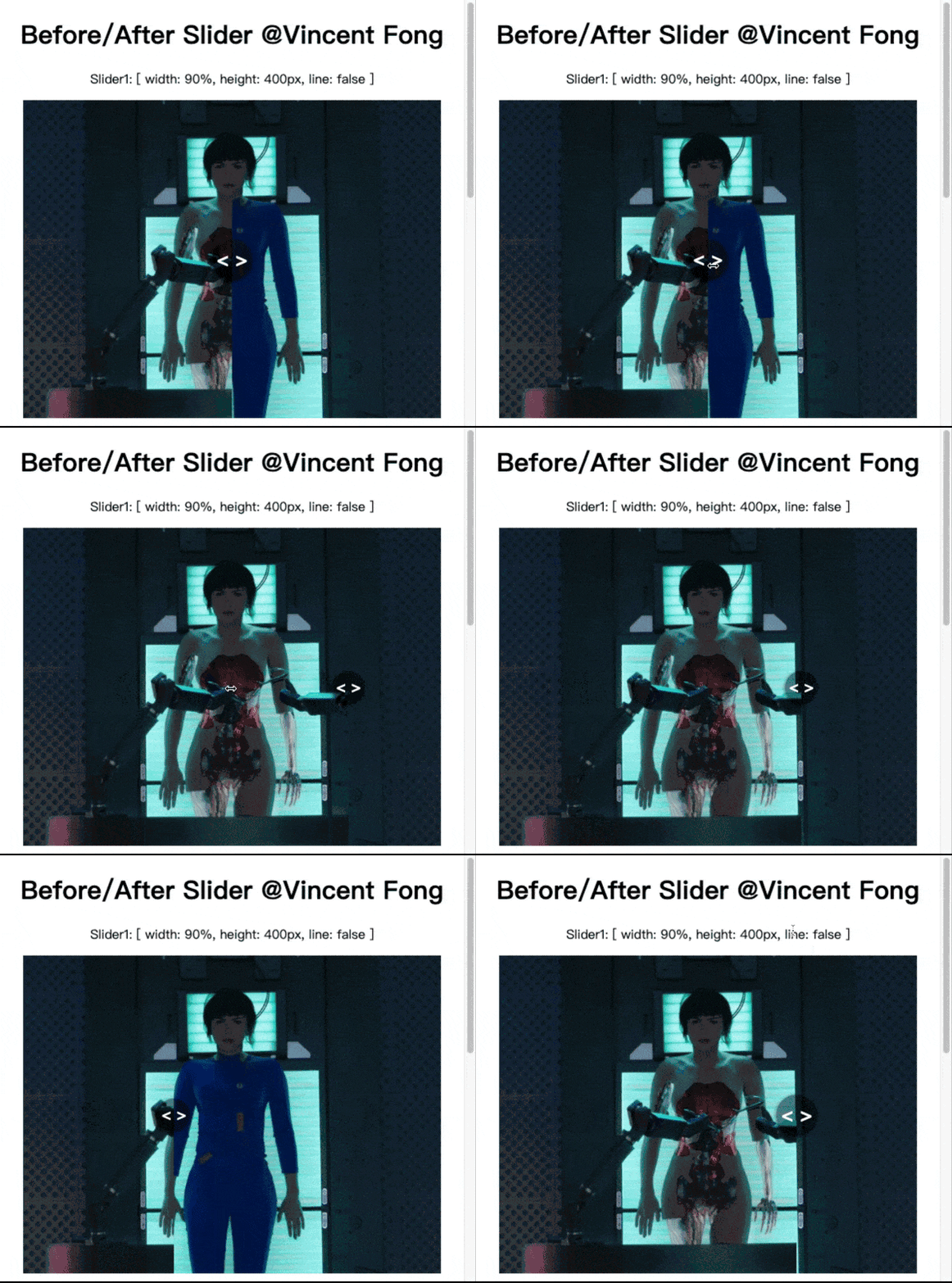
轻量级JS库，支持PC鼠标及移动端触摸滑动，轻松简单实现图片Before/After效果。

- 原生ES6开发、不依赖任何框架和库的轻量级图片Before/After效果，类库大小仅 9KB。
- 支持鼠标 mousemove 和 屏幕 touchmove。
- 不需要设置样式，自适应宽度。
- 可自定义图片、区域大小、滑动条及颜色等。
- 滑动区域自适应居中，图片以高度自适应居中，不必额外样式处理，方便布局。
- API简洁，易上手。支持 PC 及移动端。

![](https://cdn.jsdelivr.net/gh/VincentTV/CDN@master/post/before-after-slider/slider.gif)

## 在线预览 [Demo](https://vincenttv.github.io/before-after-slider/example)

***

## 安装

* 模块支持:
    * 在浏览器环境下使用，通过`<script>`标签来引入这个类库
    * 通过NPM安装使用
    * 兼容 ES6(ES2015) 的模块系统、CommonJS 和 AMD 模块规范

### 直接`<script>`引入

CDN 引入：
```html
<script src="https://cdn.jsdelivr.net/npm/before-after-slider@1.0.0/dist/slider.bundle.js"></script>
```

如果你使用原生 ES Modules：
```html
<script type="module">
  import SliderBar from "https://cdn.jsdelivr.net/npm/before-after-slider@1.0.0/dist/slider.bundle.js";
</script>
```

使用：
```html
<div id="mySlider"></div>

<script>
  new SliderBar({
    el: '#mySlider',            // 容器，必选
    beforeImg: './before.jpg',  // 图片1，必选
    afterImg: './after.jpg',    // 图片2，必选
    width: "90%",               // 滑动区域宽度，默认外边框100%
    height: "400px",            // 高度，默认 图片高度
    line: false,                 // 是否要分割线，默认 true
    lineColor: "rgba(0,0,0,0.5)" // 分割线颜色，默认 rgba(0,0,0,0.5)
  });
</script>
```


### 通过 NPM 安装

兼容 ES6(ES2015) 的模块系统、CommonJS 和 AMD 模块规范

```shell
npm install before-after-slider --save
```

**这里以 Vue 中使用为例**

```html
<template>
  <div id="app">
    <!-- 容器 -->
    <div id="mySlider"></div>
  </div>
</template>

<script>
import SliderBar from 'before-after-slider'; // 引入包
export default {
  name: 'app',
  mounted() {
    // 浏览器渲染完成后设置参数。new SliderBar({options});
    new SliderBar({
      el: '#mySlider',
      beforeImg: './before.jpg',
      afterImg: './after.jpg'
    });
  }
}
</script>
```

## 属性

| 属性           | 类型     | 默认值               | 描述                             |
| :------------ | :------- | :------------------ | :------------------------------ |
| el            | String   |（必选参数）           | 容器，"#sliderId"                |
| beforeImg     | String   |（必选参数）           | 图片1的 URL                      |
| afterImg      | String   |（必选参数）           | 图片2的 URL                      |
| width         | String   | '100%'              | 滑动区宽度,支持各种值(%,px,em,rem) |
| height        | String   | none                | 滑动区高度                        |
| line          | Boolean  | true                | 是否需要添加分割线                 |
| lineColor     | String   | 'rgba(0, 0, 0, .5)' | 分割线颜色，支持透明色              |

## 备注

**请确保两张图片一样宽高。**

**🤪还有欢迎大家来我博客吐槽🤪：[https://vincef0ng.cn](https://vincef0ng.cn/)**

## How to Contribute

Anyone and everyone is welcome to contribute to this project. The best way to start is by checking our [open issues](https://github.com/VincentTV/before-after-slider/issues),[submit a new issues](https://github.com/VincentTV/before-after-slider/issues/new?labels=bug) or [feature request](https://github.com/VincentTV/before-after-slider/issues/new?labels=enhancement), participate in discussions, upvote or downvote the issues you like or dislike.

## License

[**The MIT License**](http://opensource.org/licenses/MIT).